Distortion Filter
通过采样一个 Shader 来扭曲 Shapes。
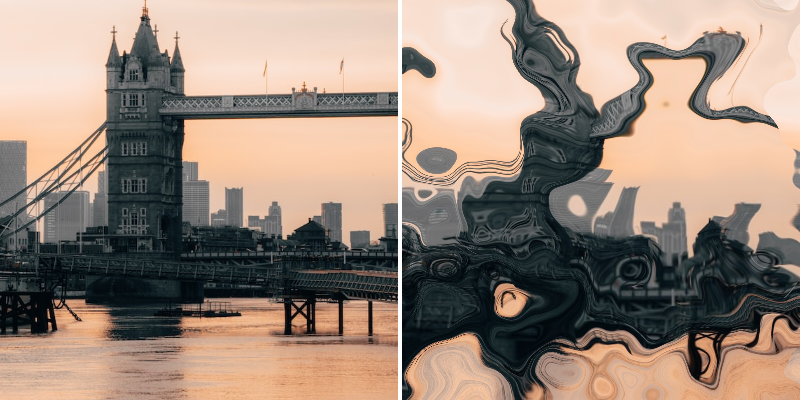
Photo by Charlie Harris on Unsplash
- Settings
- Shader
Amplitude - 确定扭曲的强度。
Sample Mode - 确定 Input Shader 的采样方式。参见 Common Attributes。
Invert - 反转 Input Shader 的值 — 0-1 的值反转为 1-0。
Direction Mode - 设置扭曲的类型:
- Lens - 将像素坐标推向或拉离中心。大于 0.5 的值会远离中心移动,小于 0.5 的值会朝中心移动。
- Directional - 沿 Direction Angle 指定的方向推动像素坐标。大于 0.5 的值沿 Direction Angle 移动,小于 0.5 的值沿相反方向移动。例如
Direction Angle - 180。 - Warp - 将像素坐标推向一个方向,像素值被重新映射到方向。0-1 的值重新映射为 0°-360° 的角度。
Curve Interpolation - 确定来自 Distortion Shader 的值如何重新映射(仅在 Direction Mode 设置为 Lens 时有效):
- Sine Wave - 使用正弦波(S 曲线)重新映射。这会产生更平滑的扭曲。
- Linear - 使用线性重新映射。
Distortion Offset - 增加/减少扭曲。注意 - 当 Direction Mode 设置为 Warp 时不适用。
Automatic Padding - 根据扭曲结果自动调整 Shape 的边界框。注意 - 仅在 Direction Mode 设置为 Directional 或 Warp 时适用。
Padding - 手动调整 Shape 的边界框以显示/裁剪扭曲结果。
Direction Angle - 为 Directional 方向模式设置角度。
Use Single Direction - 当 Direction Mode 设置为 Directional 时,只沿一个方向推动像素。所有大于 0 的值将沿 Direction Angle 移动。
Show Preview - 在 Viewport 中显示 Input Shader 的预览。
Preview Opacity - 增加/减少 Input Shader 预览的不透明度。
Input Shader - 选择一个 Shader 来驱动扭曲。