SkSL Shader
SkSL(“Skia Shading Language”)是 GLSL 的一种变体,用作 Skia 的内部着色语言。只需进行少量修改,来自 https://www.shadertoy.com/ 等站点的 GLSL 代码即可转换供 Cavalry 使用。
有关 GLSL 和 SkSL 之间差异的更多详细信息,请参阅 Skia documentation。
SkSL Shader 不接受整数 uniform,请改用浮点数。
Blend Mode - 参见 Blend Modes。
Shader Code - 在此处粘贴/编辑 SkSL 代码。
Inputs - 点击 + 按钮选择 uniform 类型并添加。Uniform 可以通过右键点击属性并选择 Rename… 来重命名。此名称可在 SkSL Code 中用作变量。
要采样输入 shader,请使用 inputShader.eval(p),其中 inputShader 是 uniform 的名称,p 是要采样的坐标。
Export to Plugin
标题为“Export to Plugin”的章节点击 Export to Plugin... 加载导出窗口,可用于将 Layer 导出为 Plugin。
Author - 设置用于填充 definitions.json 中 "author" 键的字符串。此字段在会话之间保留。
Plugin Name - 设置用于填充 strings.json 中 "niceName" 键的字符串
Encrypt - 选中时,导出的文件将被加密。
Export… - 点击 Export 选择文件导出位置。Author 和 Plugin Name 字段是必需的。
请注意,可能需要对导出的文件进行一些调整。例如,可能需要添加图标、工具提示等。
Built in Uniforms
标题为“Built in Uniforms”的章节内置 Uniforms 可以添加到 Shader Code 中:
resolution- 正在渲染的 Shape 大小,可用于生成随其内容缩放的 Shaders。参见Create > Demo Scenes > Custom Shaders and Filters > Truchet Tiles中的示例。
Examples
标题为“Examples”的章节可以通过 Create > Demo Scenes > Custom Shaders and Filters 菜单加载多个示例。
- 创建一个 Rectangle。
- 在 Attribute Editor 的 Fill 选项卡中,右键点击 Shaders 属性 >
Add Shader > SkSL Shader。 - 双击 SkSL Shader 加载其 Attribute Editor UI。
- 右键点击 n0 uniform,选择 Rename… 并重命名为
time。 - 用下面的示例代码替换默认的 Shader Code。
Rectangle 上将出现蓝色火焰。尝试将 Frame Behaviour 连接到 time uniform。
// Created by Anatole Duprat - XT95/2013// License Creative Commons Attribution-NonCommercial-ShareAlike 3.0 Unported License.float noise(vec3 p) //Thx to Las^Mercury{ vec3 i = floor(p); vec4 a = dot(i, vec3(1., 57., 21.)) + vec4(0., 57., 21., 78.); vec3 f = cos((p-i)*acos(-1.))*(-.5)+.5; a = mix(sin(cos(a)*a),sin(cos(1.+a)*(1.+a)), f.x); a.xy = mix(a.xz, a.yw, f.y); return mix(a.x, a.y, f.z);}float sphere(vec3 p, vec4 spr){ return length(spr.xyz-p) - spr.w;}float flame(vec3 p){ float d = sphere(p*vec3(1.,.3,1.), vec4(.0,-1.,.0,1.)); return d + (noise(p+vec3(.0,time*0.1,.0)) + noise(p*3.)*.5)*.25*(p.y) ;}float scene(vec3 p){ return min(100.-length(p) , abs(flame(p)) );}vec4 raymarch(vec3 org, vec3 dir){ float d = 0.0, glow = 0.0, eps = 0.02; vec3 p = org; bool glowed = false; for(int i=0; i<64; i++) { d = scene(p) + eps; p += d * dir; if( d>eps ) { if(flame(p) < .0) glowed=true; if(glowed) glow = float(i)/64.; } } return vec4(p,glow);}half4 main(vec2 fragCoord){ vec2 uv = 4.0 * fragCoord.xy / resolution.xy; uv.x *= resolution.x / resolution.y; vec3 org = vec3(0., -4.5, 4.); vec3 dir = normalize(vec3(uv.x*1.6, -uv.y, -1.5)); vec4 p = raymarch(org, dir); float glow = p.w; half4 col = mix(half4(1.,.5,.1,1.), half4(0.1,.5,1.,1.), p.y*.02+.4); return half4(mix(half4(0.), col, pow(glow*2.,4.)));}Flat colour
标题为“Flat colour”的章节-
删除默认的
n0uniform。右键点击属性并选择 Delete Selected Attribute。 -
使用
+按钮添加 Color (half4) uniform。 -
将下面的代码粘贴到 Shader Code 输入中:
half4 main(float2 fragCoord) { return n0; } -
在 uniform 上调整颜色值。
Cycling colour
标题为“Cycling colour”的章节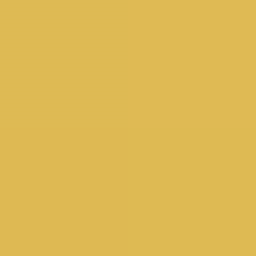
-
将现有的 n0 uniform 重命名为
time。右键点击属性并选择 Rename…。 -
将下面的代码粘贴到 Shader Code 输入中:
vec3 colorA = vec3(0.149,0.141,0.912); vec3 colorB = vec3(1.000,0.833,0.224); half4 main(vec2 fragCoord) { vec3 color = vec3(0.0); float percent = abs(sin(time*.01)); // Mix uses percent (a value from 0–1) to... // ...mix the two colors color = mix(colorA, colorB, percent); return half4(color,1.0); } -
拖动 time uniform。
Pixels
标题为“Pixels”的章节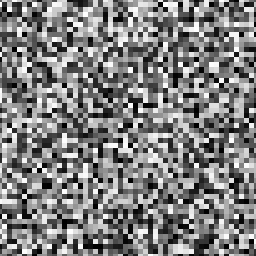
-
将现有的 n0 uniform 重命名为
scale。右键点击属性并选择 Rename…。 -
将下面的代码粘贴到 Shader Code 输入中:
float random (vec2 uv) { return fract(sin(dot(uv.xy , vec2(12.9898,78.233))) * 43758.5453); } half4 main(vec2 fragCoord) { vec2 uv = fragCoord / resolution.xy; uv *= max(1.0, scale); // Scale the coordinate vec2 ipos = floor(uv); // get the integer coords vec2 fpos = fract(uv); // get the fractional coords // Assign a random value based on the integer coord vec3 color = vec3(random(ipos)); return half4(color,1.0); } -
增加 uniform 的值。
Fractal Brownian motion
标题为“Fractal Brownian motion”的章节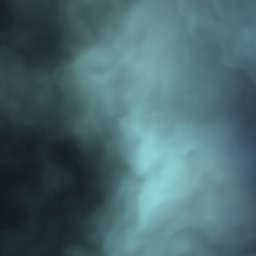
-
将现有的 n0 uniform 重命名为
time。右键点击属性并选择 Rename…。 -
将下面的代码粘贴到 Shader Code 输入中:
float random (vec2 uv) { return fract(sin(dot(uv.xy, vec2(12.9898,78.233))) * 43758.5453123); } // Based on Morgan McGuire @morgan3d // https://www.shadertoy.com/view/4dS3Wd float noise (vec2 uv) { vec2 i = floor(uv); // Four corners in 2D of a tile vec2 f = fract(uv); float a = random(i); float b = random(i + vec2(1.0, 0.0)); float c = random(i + vec2(0.0, 1.0)); float d = random(i + vec2(1.0, 1.0)); vec2 u = (f * f * (3.0 - 2.0 * f)); return mix(a, b, u.x) + (c - a) * u.y * (1.0 - u.x) + (d - b) * u.x * u.y; } float fbm (vec2 uv) { float v = 0.0; float a = 0.5; vec2 shift = vec2(100.0); // Rotate to reduce axial bias float2x2 rot = float2x2(cos(0.5), sin(0.5), -sin(0.5), cos(0.50)); for (int i = 0; i < 5; ++i) { v += a * noise(uv); uv = rot * uv * 2.0 + shift; a *= 0.5; } return v; } half4 main(vec2 fragCoord) { float2 uv = fragCoord.xy/resolution.xy*3.; // uv += uv * abs(sin(time*0.1)*3.0); vec3 color = vec3(0.0);vec2 q = vec2(0.); q.x = fbm( uv + 0.00*time); q.y = fbm( uv + vec2(1.0));vec2 r = vec2(0.); r.x = fbm( uv + 1.0*q + vec2(1.7,9.2)+ 0.15*time ); r.y = fbm( uv + 1.0*q + vec2(8.3,2.8)+ 0.126*time); float f = fbm(uv+r); color = mix(vec3(0.101961,0.619608,0.666667), vec3(0.666667,0.666667,0.498039), clamp((f*f)*4.0,0.0,1.0)); color = mix(color, vec3(0,0,0.164706), clamp(length(q),0.0,1.0)); color = mix(color,vec3(0.666667,1,1),clamp(length(r.x),0.0,1.0)); return half4((f*f*f+.6*f*f+.5*f)*color,1.); } -
增加 uniform 的值。