Grid Layout Group
Grid Layout Group 可用于将 Grid Layout Row 的行组织成列,以创建网格。
虽然 Layout Group 也可以使用 Wrap 功能创建网格,但 Grid Layout Group 可用于每行需要特定数量项目的情况。
- 创建 3 个 Shapes。
- 选中所有 3 个 Shapes,在 Viewport 中右键单击,然后选择 Layout > Embed selected in Grid Layout。
这将创建以下层级结构:
Grid Layout Group ┠ Grid Layout Row ┠ Shape1 ┠ Shape2 ┠ Shape3Grid Layout Group 需要 Grid Layout Row 作为子级。可以直接将 Shapes 添加到 Grid Layout Group,但如果没有 Grid Layout Row,它只是一个更复杂的垂直布局。
Grid Layout Group 的列由放置在 Grid Layout Row 中的项目定义。行中的项目数量不需要匹配,因此一个包含 10 个项目的 Grid Layout Row 可以与一个包含 3 个项目的 Grid Layout Row 一起嵌套在 Grid Layout Group 中。Spacers 可用于在行中创建空白布局项,以构建均匀列的网格。
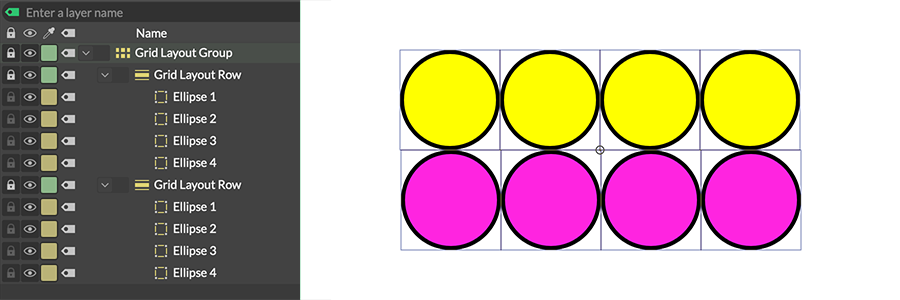
Grid Layout Group 中包含相同数量 Shapes 的 Grid Layout Rows。
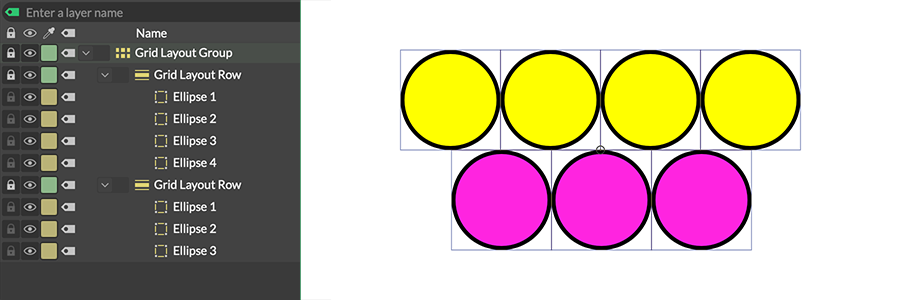
Grid Layout Group 中包含不同数量 Shapes 的 Grid Layout Rows。
放置在 Grid Layout Group 中但不在 Grid Layout Row 内的任何 Shape 将被视为跨所有列的全宽布局项。
Draw Extents - 勾选后,将在 Viewport 中绘制 Minimum Size 和 Maximum Size 的表示。
Minimum Size - 确定布局在另一个布局中所占的最小宽度和高度。
Maximum Size - 确定 Shapes 在布局内可以填充的最大宽度和高度。一旦布局组中 Shapes 的总宽度/高度超过这些值,Shapes 将开始重叠。默认情况下,Maximum Size 连接到合成组的 Resolution — 移除该连接以设置自定义值。
如果 Maximum Size 设置为小于 Minimum Size 的值,Maximum Size 将在内部被限制为 Minimum Size 的值(反之亦然)。这在 Attribute Editor 中不会反映出来,但可以在 Viewport 中勾选 Draw Extents 后看到。
Margins - 设置布局四周边缘(顶部、底部、左侧和右侧)的间距。
Spacing - 设置每个布局项之间显示的空间。
Ordering Policy - 确定 Grid Layouts Rows 在 Grid Layout Group 中的排列顺序:
- Layer Order - 根据 Grid Layouts Rows 在 Grid Layout Group 中的顺序排列。层级顶部的 Shape 被视为第一个布局项。
- Alphabetical - 根据 Layer Name 字母顺序排列 Grid Layouts Rows。
- Shuffle - 随机排列 Grid Layouts Rows。
Flip Order - 反转 Ordering Policy。
Shuffle Seed - 当 Ordering Policy 设置为 Shuffle 时,设置随机种子。