Rectangle Pattern
Rectangle Pattern Shape 可用于创建堆叠柱状图和饼图。输入值被归一化以适应其宽度或角度。
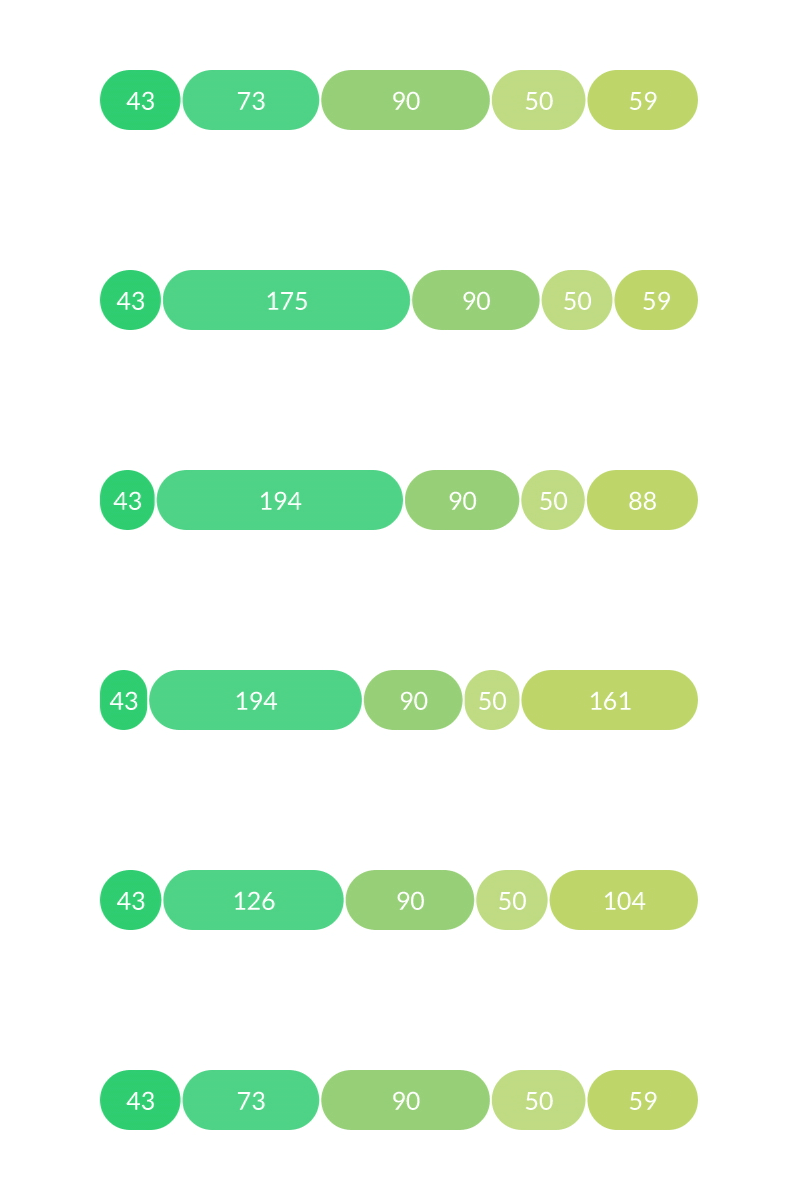
带有 Bevel Deformer 的柱状图,用于创建圆角。
- Shape
- Advanced
Pattern Mode - 设置图案的分布:
- Line - 沿直线分布矩形。
- Use Fixed Size - 勾选时,条形将缩放以适应 Size。
- Orientation - 设置线的方向:
- Horizontal - 条形沿 X 轴定向。
- Vertical - 条形沿 Y 轴定向。
- Size - 设置 Shape 的固定大小。
- Gap Type - 设置间隙样式:
- Alternating - 每个间隙由 Bar Size 设置。在此模式下,Count 包括矩形和间隙。
- Fixed Width - 每个间隙由 Fixed Gap Width 设置。在此模式下,间隙是 Count 之外的附加项。
- Fixed Gap Width - 设置每个间隙的固定宽度。
- Alignment - 将 Shape 对齐到其左边缘 (0) 和右边缘 (1) 之间的位置。
- Ring - 沿环形分布矩形。
- Outer Radius - 设置环的外半径。
- Inner Radius - 设置环的内半径。
- Start Angle - 设置起始角度。
- End Angle - 设置结束角度。
- Gap Type - 设置间隙样式:
- Alternating - 每个间隙由 Bar Size 设置。在此模式下,Count 包括矩形和间隙。
- Fixed Angle - 每个间隙由 Fixed Gap Angle 设置。在此模式下,间隙是 Count 之外的附加项。
- Fixed Gap Angle - 为每个间隙设置固定角度。
Count - 设置矩形和间隙的总数。
Dynamic Bar Size - 连接一个 Behaviour 来设置矩形的大小。值被归一化以适应 Size。
注意,「间隙」实际上是一个空矩形,因此将例如 Random Behaviour 连接到 Dynamic Bar Size 将创建随机大小的矩形和间隙。
Use Index Context - 勾选时,Rectangle Pattern Shape 将拉取 Context。这可用于控制如何分配 Ids,从而单独影响每个矩形——例如,通过 Sub-Mesh 将 Color Array 添加到 Rectangle Pattern Shape 的 Fill Color。
- 创建一个 Rectangle Pattern Shape。
- 将 Gap Type 设为 Fixed Width。
- 将 Count 设为 5。
- 创建一个 Value Array。
- 向 Value Array 添加 4 个索引(共 5 个),并为每个设置不同的值。
- 连接 valueArray.id→rectanglePatternShape.dynamicBarSize。
Value Array 中的值被归一化以适应 Rectangle Pattern Shape 的宽度。尝试将 Pattern Mode 更改为 Ring。
可以使用 Sub-Mesh 向 Rectangle Pattern Shape 的每个部分添加颜色:
- 点击 Rectangle Pattern Shape 的 Deformers 属性旁边的
+。 - 从列表中选择 Sub-Mesh。
- 在 Sub-Mesh 的 Fill 选项卡上,勾选 Replace Fill。
- 右键单击 Sub-Mesh 的 Color 属性,选择
Add Array > Color Array。 - 向 Color Array 添加 4 个索引(共 5 个),并为每个设置不同的颜色。