Component
Components 是包含其他 Layers 集合的 Layers。這些 Layers 的屬性可以提升到 Component 中,以建立自訂使用者介面。
透過將其他 Layers 設為 Component 的子級,這些 Layers 可以被 Component 隱藏,從而建立簡化的使用者介面。請參閱 編輯 Component。
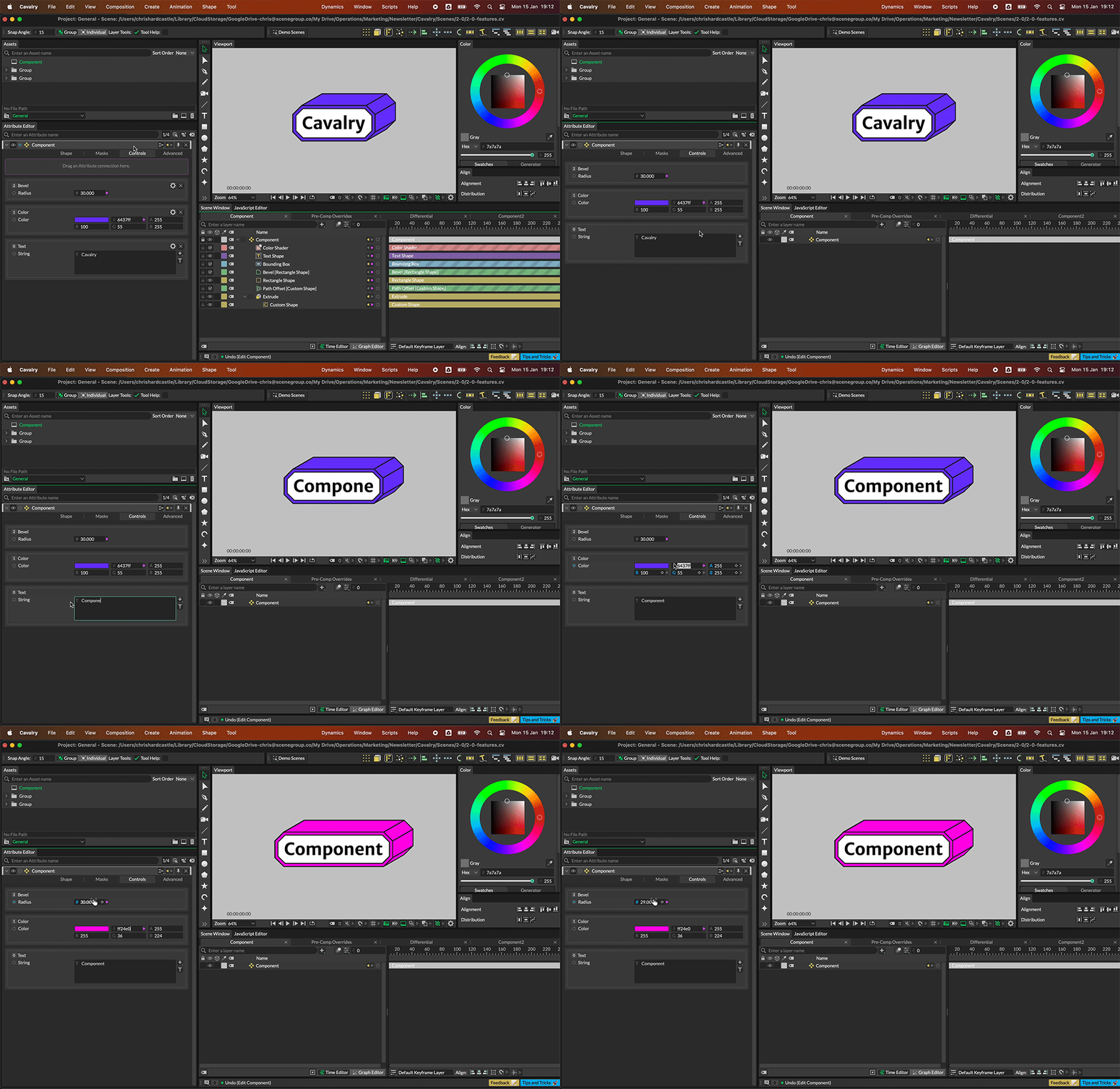
折疊 Component 以篩選提升的控制項。
任何可以建立連線的屬性都可以在 Component 中使用。
- 建立一個 Component。
- 建立一個 Rectangle。
- 在 Attribute Editor 中,將 Rectangle 的 Size 屬性的連線拖到 Component 的 Control 索引標籤 UI 頂部的紫色區域。
- 在 Scene Window 中將 Rectangle 設為 Component 的子級。
- 在 Attribute Editor 中,右鍵按一下 Size 屬性並選擇 Rename。
- 為該屬性指定一個自訂標籤。
- 在 Attribute Editor 中,右鍵按一下 Component 的標題欄。
- 選擇 Component 並取消勾選 Edit Component。
- 在 Attribute Editor 中,右鍵按一下 Component 的標題欄。
- 選擇 Component 並勾選 Compact Layout。
Component 的 UI 將簡化,並且 Rectangle 將從 Layer 堆疊中隱藏。
編輯 Component
标题为“編輯 Component”的章节Components 有兩種模式,可以透過在 Attribute Editor 中右鍵按一下 Layer 的標題欄並從 Component 選單中選擇選項來存取。
- 已勾選 - 來自其他 Layers 的屬性可以新增到 Component 中。作為 Component 子級的任何 Layers 在 Scene Window 中可見。
- 未勾選 - 作為 Component 子級的任何 Layers 在 Scene Window 中隱藏,並且阻止新增或移除其他 Layers 的屬性。
向 Component 新增屬性
标题为“向 Component 新增屬性”的章节要向 Component 新增屬性,在 Attribute Editor 中,將連線從 Layer 的屬性拖到 Component 的 Control 索引標籤 UI 頂部的紫色區域。
從 Component 移除屬性
标题为“從 Component 移除屬性”的章节要從 Component 移除屬性,可以:
- 右鍵按一下 Component 的 Control 索引標籤中的屬性並選擇 Remove from Component。
- 使用來源屬性的連線圖示。
可以透過右鍵按一下屬性並選擇「Rename」來自訂屬性標籤。