Grid Layout Group
Grid Layout Group 可用於將 Grid Layout Row 的行組織成列,以建立網格。
雖然 Layout Group 也可以使用 Wrap 功能建立網格,但 Grid Layout Group 可用於每行需要特定數量項目的情況。
- 建立 3 個 Shapes。
- 選取所有 3 個 Shapes,在 Viewport 中右鍵單擊,然後選擇 Layout > Embed selected in Grid Layout。
這將建立以下層級結構:
Grid Layout Group ┠ Grid Layout Row ┠ Shape1 ┠ Shape2 ┠ Shape3Grid Layout Group 需要 Grid Layout Row 作為子級。可以直接將 Shapes 添加到 Grid Layout Group,但如果沒有 Grid Layout Row,它只是一個更複雜的垂直佈局。
Grid Layout Group 的列由放置在 Grid Layout Row 中的項目定義。行中的項目數量不需要匹配,因此一個包含 10 個項目的 Grid Layout Row 可以與一個包含 3 個項目的 Grid Layout Row 一起巢狀在 Grid Layout Group 中。Spacers 可用於在行中建立空白佈局項,以構建均勻列的網格。
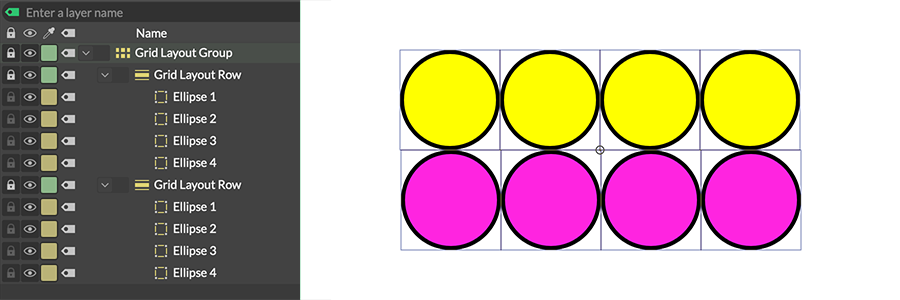
Grid Layout Group 中包含相同數量 Shapes 的 Grid Layout Rows。
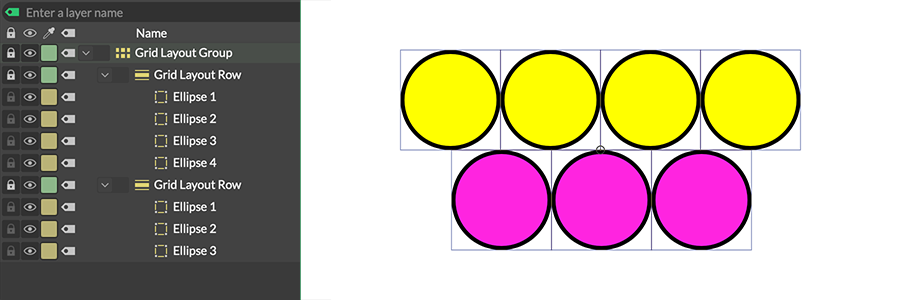
Grid Layout Group 中包含不同數量 Shapes 的 Grid Layout Rows。
放置在 Grid Layout Group 中但不在 Grid Layout Row 內的任何 Shape 將被視為跨所有列的全寬佈局項。
Draw Extents - 勾選後,將在 Viewport 中繪製 Minimum Size 和 Maximum Size 的表示。
Minimum Size - 確定佈局在另一個佈局中所佔的最小寬度和高度。
Maximum Size - 確定 Shapes 在佈局內可以填充的最大寬度和高度。一旦佈局組中 Shapes 的總寬度/高度超過這些值,Shapes 將開始重疊。預設情況下,Maximum Size 連接到合成組的 Resolution — 移除該連接以設定自訂值。
如果 Maximum Size 設定為小於 Minimum Size 的值,Maximum Size 將在內部被限制為 Minimum Size 的值(反之亦然)。這在 Attribute Editor 中不會反映出來,但可以在 Viewport 中勾選 Draw Extents 後看到。
Margins - 設定佈局四周邊緣(頂部、底部、左側和右側)的間距。
Spacing - 設定每個佈局項之間顯示的空間。
Ordering Policy - 確定 Grid Layouts Rows 在 Grid Layout Group 中的排列順序:
- Layer Order - 根據 Grid Layouts Rows 在 Grid Layout Group 中的順序排列。層級頂部的 Shape 被視為第一個佈局項。
- Alphabetical - 根據 Layer Name 字母順序排列 Grid Layouts Rows。
- Shuffle - 隨機排列 Grid Layouts Rows。
Flip Order - 反轉 Ordering Policy。
Shuffle Seed - 當 Ordering Policy 設定為 Shuffle 時,設定隨機種子。